

官网
https://higress.cn/
简介
Higress 是一款云原生 API 网关,内核基于 Istio 和 Envoy,可以用 Go/Rust/JS 等编写 Wasm 插件,提供了数十个现成的通用插件,以及开箱即用的控制台(demo 点这里)
Higress 在阿里内部为解决 Tengine reload 对长连接业务有损,以及 gRPC/Dubbo 负载均衡能力不足而诞生。
阿里云基于 Higress 构建了云原生 API 网关产品,为大量企业客户提供 99.99% 的网关高可用保障服务能力。
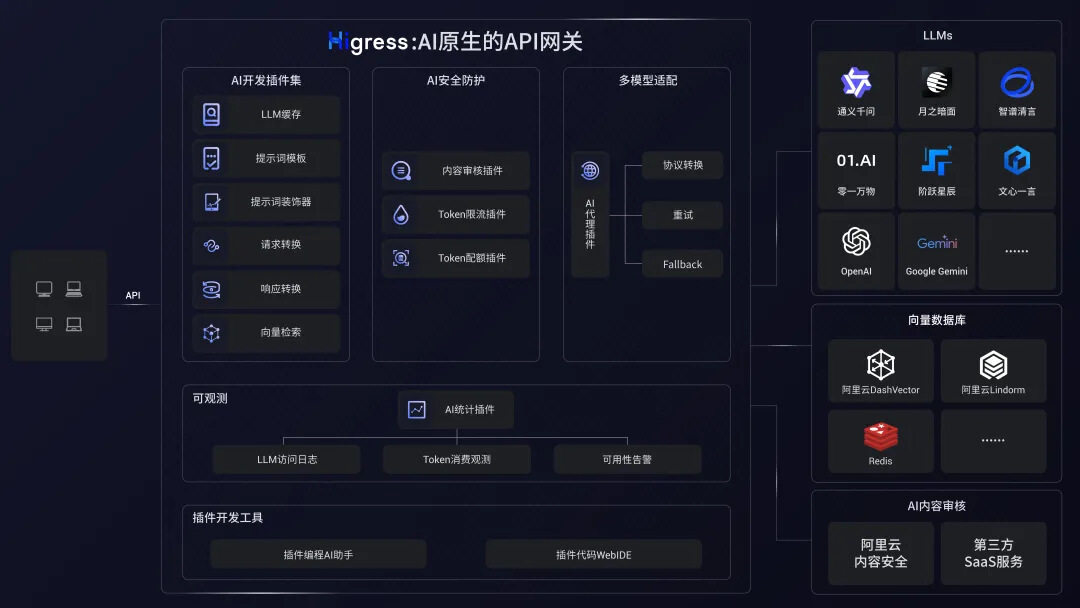
Higress 基于 AI 网关能力,支撑了通义千问 APP、百炼大模型 API、机器学习 PAI 平台等 AI 业务。同时服务国内头部的 AIGC 企业(如零一万物),以及 AI 产品(如 FastGPT)
AI网关场景
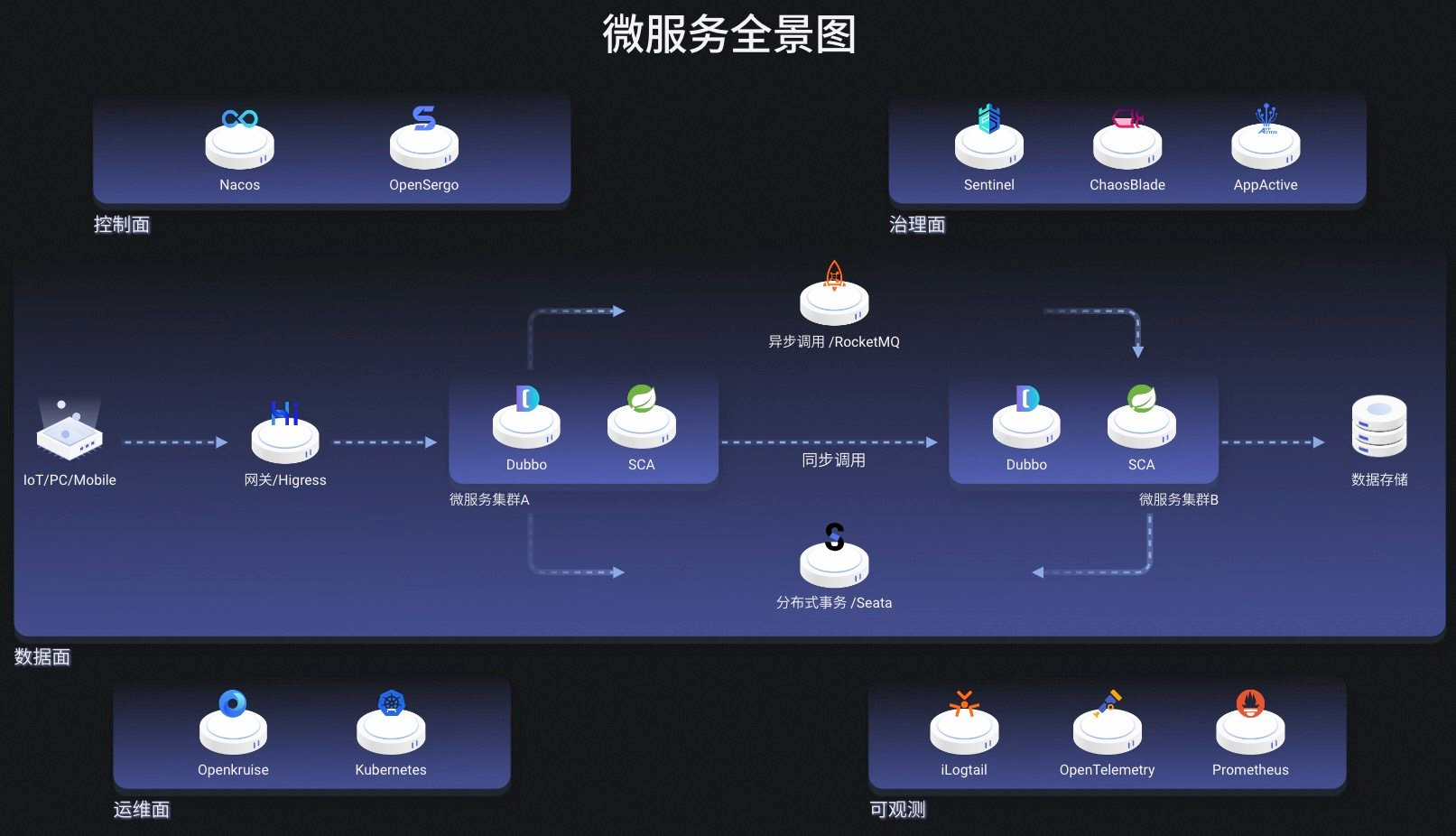
微服务场景
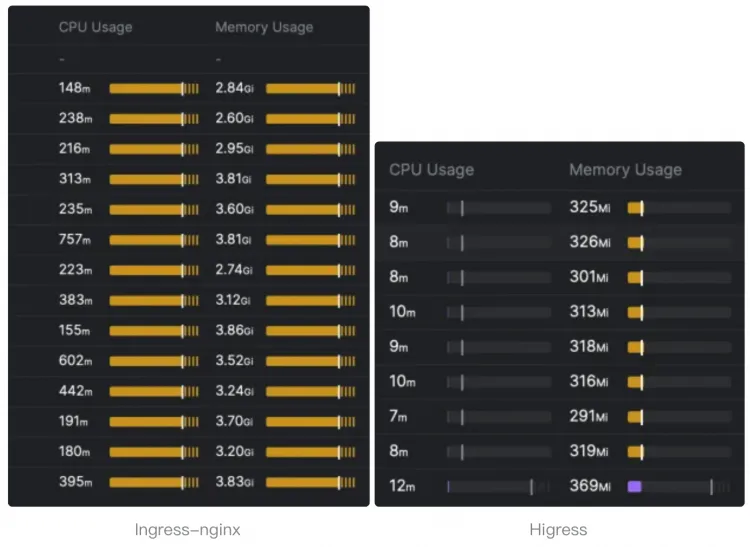
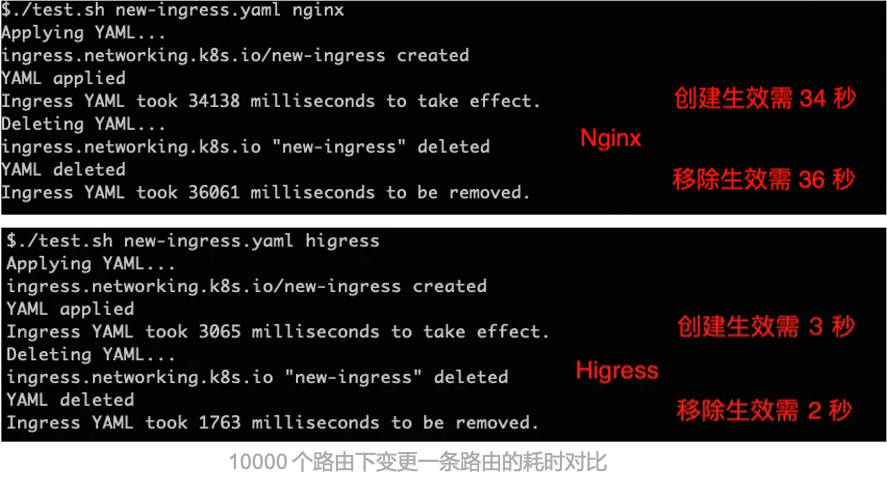
higress与ingress-nginx对比
cpu和内存使用情况
10000个路由下变更一条路由耗时对比
安装方式
hgctl方式
下载最新版本的 hgctl 到本地
curl -Ls https://raw.githubusercontent.com/alibaba/higress/main/tools/hack/get-hgctl.sh | bash安装profile说明
higress 目前支持三个内置预定义 profile 包括: local-k8s , k8s, local-docker
local-k8s profile 安装 higress 到本地 k8s 集群比如 kind 集群,主要用于开发和测试 higress 功能。 默认安装 higress 核心组件外,还安装包括可观测组件(Grafana + Promethues), IstioAPI, GatewayAPI组件。
k8s profile 安装 higress 到 k8s 集群, 默认只安装 higress 核心组件。
local-docker profile 安装 higress 到本地 docker 环境。
如:hgctl install --set profile=local-k8s
helm安装
注意:Helm 版本需要 >= 3.10
场景一:在标准 K8s 集群中使用
helm repo add higress.io https://higress.cn/helm-charts
helm install higress -n higress-system higress.io/higress --create-namespace --render-subchart-notes
场景二:在本地 K8s 环境中使用
helm repo add higress.io https://higress.io/helm-charts
helm install higress -n higress-system higress.io/higress --create-namespace --render-subchart-notes --set global.local=true --set global.o11y.enabled=false
场景三:手动修改values.yaml
helm repo add higress.io https://higress.io/helm-charts
helm pull higress.io/higress
tar -zxvf higress-2.2.3.tgz  #我这里下载的是2.2.3版本
cd higress/charts
mv higress-core /root  #我这里只安装核心功能,不安装console界面,因为我不需要界面配置,在命令行直接配置
cd higress-core
编辑values.yaml文件,修改
local: false ===> local: true
imagePullPolicy: "" ===> imagePullPolicy: "IfNotPresent"
gateway:
  replicas: 2  ====> replicas: 1 #我这里设置成一个,因为这里是本地部署,如果要部署多个需要加负载均衡
  hostNetwork: false ===> hostNetwork: true
  service:
    type: loadBalancer ===> type: ClusterIP
  resources:
    limits:
      cpu: 8000m     #这里根据自己的情况设置
      memory: 8192Mi  #这里根据自己的情况设置
  nodeSelector: {}  ===>
  nodeSelector:
    app: higress
  affinity: {} ===>
  affinity:
    podAntiAffinity:
      requiredDuringSchedulingIgnoredDuringExecution:
        - labelSelector:
            matchExpressions:
              - key: app
                operator: In
                values:
                  - higress
          topologyKey: "kubernetes.io/hostname"
  metrics:
    enabled: false ===> enabled: true

controller:
  resources:
    limits:
      cpu: 1000m
      memory: 2048Mi ===>
  resources:
    limits:
      cpu: 2000m   #这里根据自己的情况设置
      memory: 4096Mi ===>  #这里根据自己的情况设置
  nodeSelector: {}
  nodeSelector:
    app: higress
  affinity: {} ===>
  affinity:
    podAntiAffinity:
      requiredDuringSchedulingIgnoredDuringExecution:
        - labelSelector:
            matchExpressions:
              - key: app
                operator: In
                values:
                  - higress
          topologyKey: "kubernetes.io/hostname"

kubectl label node node名字 app=higress
helm install higress higress-core -n higress-system --create-namespace
部署后截图

创建一个ingress服务
apiVersion: networking.k8s.io/v1
kind: Ingress
metadata:
  name: test-web
  annotations:
    higress.io/load-balance: "least_conn"
spec:
  ingressClassName: higress
  tls:
  - hosts:
    - www.xxxx.com
    secretName: xxxx.com
  rules:
  - host: www.xxxx.com
    http:
      paths:
      - path: /
        pathType: Prefix
        backend:
          service:
            name: test-web
            port:
              number: 2000